What Is AVIF? AVIF vs WebP vs JPG, Tested
AVIF (AV1 Image File Format) is an image format released in 2019 by the Alliance for Open Media, a group that includes Google, Mozilla, Microsoft, Netflix, Amazon and Apple. It takes the compression from the AV1 video codec and applies it to still images, and it's often described as the most efficient image format you can use on the web today.
That reputation is mostly deserved, but the details matter. We ran our own test on five photos, measuring both file size and how long each format takes to create. The results are more nuanced than "AVIF is always smallest".
What makes AVIF different?
- Very efficient compression. AVIF is especially good at smooth gradients such as skies, skin and soft backgrounds, where JPG tends to break into visible blocks.
- Transparency, like PNG and WebP.
- HDR and wide color, with 10-bit and 12-bit color depth for modern displays.
- Royalty-free. Unlike HEIC, which depends on the patented HEVC codec, AVIF is free to implement. That's why browsers adopted it.
Our test: is AVIF really smaller?
We used the same five photos as in our WebP test: a coffee cup, a cat, an astronaut, a Hubble deep-space image and a rocket launch, all public domain or CC0. We saved each one as JPG, WebP and AVIF at several quality settings, using the same image library our converters run on.
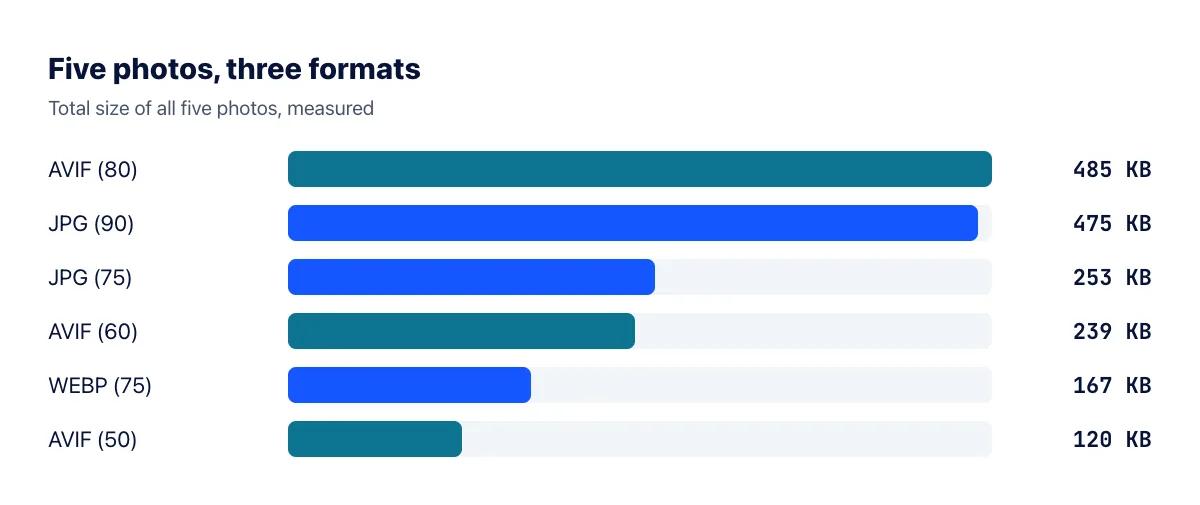
The first surprise: at quality 80, the setting our AVIF converter uses, AVIF wasn't smaller than JPG at quality 90. The five files came to 485 KB against 475 KB. That's because the quality scales aren't comparable between formats. AVIF at 80 is a very high-quality setting that keeps almost all detail, and our converter is tuned that way on purpose so conversions don't visibly degrade your images.
Lower the setting and AVIF pulls ahead. At quality 50, the five photos totalled just 120 KB, 28% smaller than WebP at quality 75 and less than half of JPG at quality 75. When we zoomed in to 200% on the coffee photo, AVIF at 50 had smoothed out some fine texture in the coffee, but at normal viewing size the difference was hard to spot.
The takeaway: AVIF can produce the smallest files of any common format, but only when you choose a lower quality setting. Always check the result with your own eyes on your own images.
The catch: AVIF is slow to create
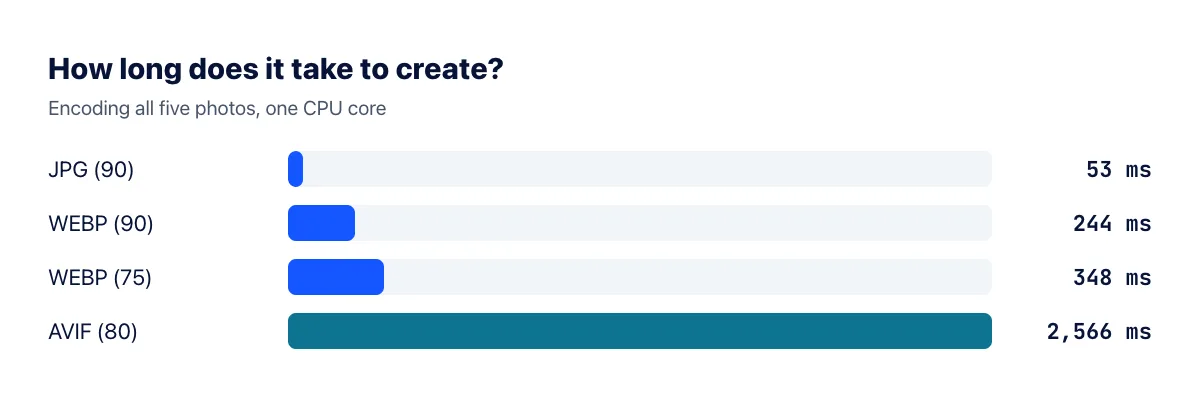
Encoding all five photos as AVIF took about 2.6 seconds on one CPU core, against 53 milliseconds for JPG, roughly 48 times slower. The largest photo, the 1000×872 Hubble image, took over a second on its own. For a single image that doesn't matter, but for a site that processes thousands of uploads, the extra server time is a real cost. Decoding in the browser is much faster than encoding, so your visitors don't pay this price.
Other drawbacks
- Weaker compatibility outside browsers. Many image editors, office apps and older photo viewers still can't open AVIF.
- Not ideal for sharing. Someone on an older computer may not be able to open an AVIF file you send them.
- Little benefit for tiny images. For icons and small thumbnails of a few KB, AVIF's file header overhead can cancel out its savings.
Which browsers support AVIF?
All of the major ones: Chrome (since version 85), Firefox (since 93), Safari (since 16, on iOS 16 and macOS Ventura) and Edge (since 121). The only visitors who miss out are those on older iPhones or very old browsers, which is why it's good practice to provide a fallback.
AVIF or WebP?
| Situation | Best choice |
|---|---|
| Large hero images and banners | AVIF, with a WebP or JPG fallback |
| Lots of product or blog images | WebP: fast to create and small enough |
| Photos you email or upload to forms | JPG |
| Logos and icons | SVG, or PNG/WebP |
The safest way to use AVIF on a website is the <picture> element. Browsers that understand AVIF download it; older ones fall back to WebP or JPG automatically:
<picture><source srcset="photo.avif" type="image/avif"><source srcset="photo.webp" type="image/webp"><img src="photo.jpg" alt="Description" width="1200" height="800"></picture>
How to convert images to AVIF
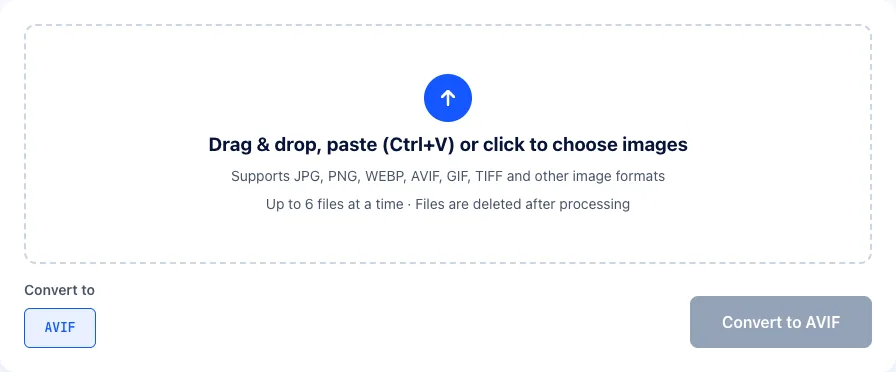
- Open the image to AVIF converter.
- Drop in your JPG, PNG or WebP images, up to 6 at a time.
- Click Convert to AVIF, wait a few seconds (AVIF takes longer than other formats, as our test showed) and download the results.
Received an AVIF file you can't open? Convert it back with AVIF to JPG or AVIF to PNG.
Frequently asked questions
Does AVIF support animation?
Yes. AVIF supports animated image sequences, typically much smaller than GIF. Tooling for animated AVIF is still less common than for animated WebP or MP4 video, though.
Can I use AVIF in WordPress?
Yes. WordPress has accepted AVIF uploads since version 6.5, as long as the image library on your hosting server supports AVIF. If uploads fail, ask your host, or use WebP instead.
Why is AVIF encoding so slow?
AVIF's encoder tries many different ways of splitting and predicting each block of the image to find the smallest result. That search costs CPU time. The trade-off is that you encode once and every visitor benefits each time the page loads.
The bottom line
AVIF can produce the smallest image files on the web, but only at moderate quality settings. At very high quality it's no smaller than JPG, and it's dramatically slower to create. Use it for a few large, important images where every kilobyte counts, use WebP for everything else on your site, and keep JPG for anything you send to other people.