What Is a HEIC File? iPhone Photos Explained
If you use an iPhone, your photo library is almost certainly full of HEIC files, even if you've never seen the word before. You usually only notice when something goes wrong: you copy photos to a Windows laptop and they won't open, an upload form rejects them, or someone you emailed asks what a .heic file is.
This guide explains what HEIC is, why Apple switched to it, what it does better than JPG, and why it still causes so much friction outside Apple's own devices.
What is a HEIC file?
HEIC is the file extension for images stored in the HEIF format (High Efficiency Image File Format) and compressed with HEVC, also known as H.265. HEVC is the same compression standard used for 4K video. HEIF was developed by the Moving Picture Experts Group (MPEG), the group behind the MP3 and MP4 standards.
Apple made HEIC the default camera format in iOS 11 in 2017, on the iPhone 7 and later models. iPads use it too, and recent Macs can save screenshots and edited photos in it. Some Android phones can shoot HEIF as well, but it's rarely the default, so in practice a HEIC file almost always came from an iPhone or iPad.
Why did Apple switch from JPG to HEIC?
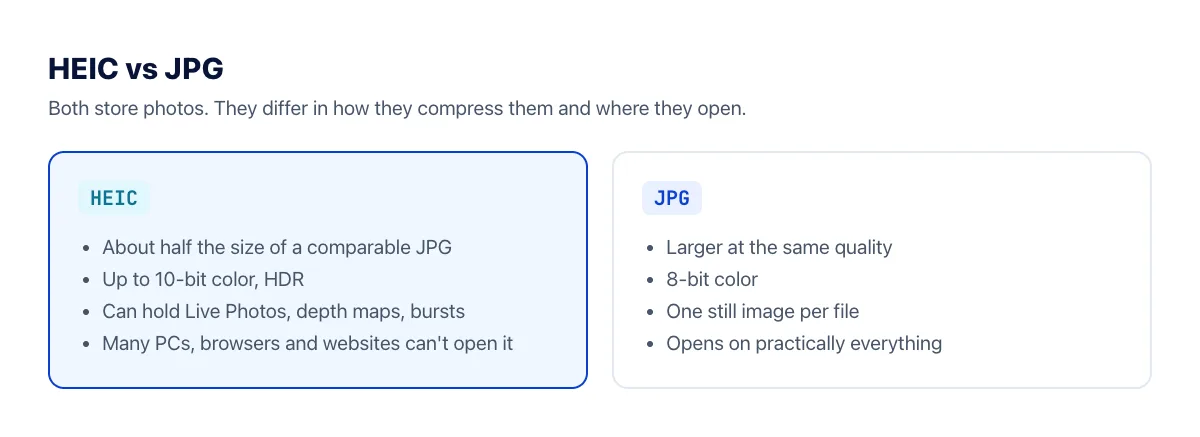
JPG dates back to 1992. It's universal, but its compression is old. HEIC uses a far more modern codec, which brings three practical benefits:
- Smaller files. Apple says a HEIC photo takes up roughly half the space of a JPG of the same quality. Across a library of thousands of photos, that's many gigabytes of storage, and less to back up to iCloud.
- Better color. HEIC can store 10-bit color, while JPG is limited to 8 bits per channel. That means smoother gradients in skies and skin tones, and room for HDR photos.
- More in one file. A HEIC file is a container. It can hold several images, a depth map (used by Portrait mode to blur the background after the fact), thumbnails and edit information. A JPG holds exactly one image.
None of this changes how a photo looks when you open it on your phone. The difference is that your iPhone can keep roughly twice as many photos in the same storage.
Why can't Windows, browsers and websites open HEIC?
The short answer is patent licensing. HEVC is covered by patents held by many different companies, and a software maker that wants to include a HEVC decoder generally has to pay royalties. Apple pays them, so HEIC just works on iPhones, iPads and Macs. Many other companies have chosen not to, and that's why:
- Windows 10 and 11 often can't open HEIC photos out of the box. You need the HEIF Image Extensions and HEVC Video Extensions from the Microsoft Store.
- Chrome, Edge and Firefox can't display HEIC images on a web page. Safari is the main exception.
- Because browsers can't show them, most websites, job portals, government forms and online stores reject HEIC uploads or only accept JPG and PNG.
- Older photo editors, office software and printing kiosks may not recognize the format at all.
Newer royalty-free formats such as AVIF exist partly because of this problem. AVIF offers similar compression and is supported by every major browser, but Apple's camera still saves HEIC.
How to open or convert a HEIC file
Which fix is best depends on what you're trying to do:
- Convert it to JPG online. The HEIC to JPG converter is the quickest option when you need to send or upload a few photos. It runs in any browser, including on a phone or a work computer where you can't install software.
- Install the Windows extensions. If you regularly receive HEIC files on a Windows PC, installing the HEIF and HEVC extensions lets the Photos app open them and shows thumbnails in File Explorer.
- Change your iPhone settings. Your iPhone can convert photos to JPG automatically when you copy them to a computer, or shoot in JPG to begin with.
We cover all of these step by step in How to convert HEIC to JPG on Windows.
Should you turn off HEIC on your iPhone?
For most people, no. HEIC lets your phone hold about twice as many photos, and iOS already converts photos to a compatible format in most everyday sharing situations. When you attach a photo in Mail or send it through most messaging apps, the recipient gets an image they can open.
Problems mostly appear when the original file leaves the Apple ecosystem: copying photos to Windows, uploading them to a website, or sending them as file attachments. If you do that every day and have plenty of free storage, you can switch the camera to JPG under Settings → Camera → Formats → Most Compatible. New photos will be saved as JPG; existing ones stay HEIC.
Frequently asked questions
Does converting HEIC to JPG reduce quality?
Slightly, in theory. JPG is a lossy format and only stores 8-bit color, so some information is discarded. Our converter saves JPGs at quality 90, where the difference is very hard to see in normal viewing. If you might want to print a photo very large or edit it heavily later, keep the original HEIC file as well.
Is HEIF the same as HEIC?
HEIF is the name of the container format, and HEIC is the most common file extension for HEIF images compressed with HEVC. In practice, .heif and .heic files are handled the same way by most software, including our converter.
What happens to Live Photos?
A Live Photo is a HEIC still image paired with a short video clip saved as a separate .mov file. Converting the HEIC to JPG gives you the still image only; the motion stays in the video file.
Can I open HEIC files on Android?
Most recent Android phones can display HEIC photos in their gallery app, and Google Photos handles them too. Older phones and some third-party apps may not, in which case converting to JPG is the reliable fix.
The bottom line
HEIC is a modern, efficient photo format that saves storage space and captures better color than JPG. Its one real weakness is compatibility outside Apple's devices, mostly because of HEVC patent licensing. Keep shooting in HEIC if you're happy with it, and convert to JPG whenever a photo needs to go somewhere that doesn't understand it.