SVG vs PNG: Vector vs Raster Images Explained
Zoom your browser to 300% on a well-built website and the logo stays perfectly crisp. Do the same with a PNG image and it turns soft and jagged. The difference comes down to two fundamentally different kinds of image: vector and raster. SVG is the web's vector format, and PNG is one of its most common raster formats.
Both support transparency, both are popular for logos and icons, and both are lossless. So which should you use? This guide explains how they differ, when each one wins, and how to convert between them.
Raster images: a grid of pixels
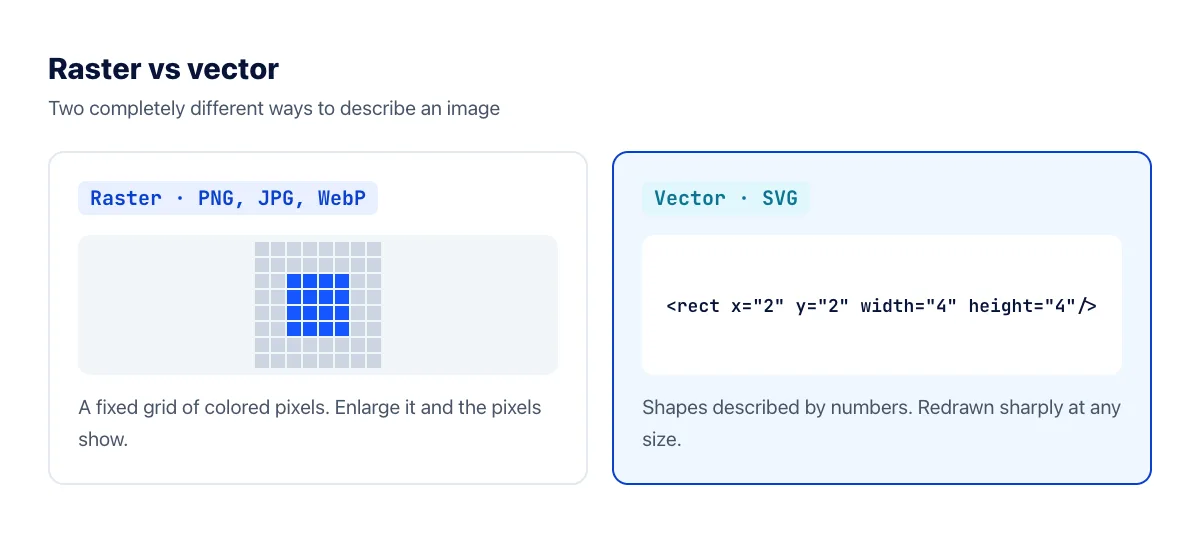
A raster image (also called a bitmap) is a fixed grid of pixels, each with its own color. PNG, JPG, WebP, AVIF, GIF and HEIC are all raster formats, and every photo from a camera or phone is a raster image.
The grid has a fixed size. When you display a raster image larger than its original dimensions, software has to invent the extra pixels by blending neighbors, so the image looks blurry or blocky. Shrinking it works fine; enlarging it never adds real detail.
Vector images: shapes described by math
A vector image doesn't store pixels at all. It stores instructions: draw a circle centered here with this radius and this color, draw a curve through these points. Your device follows those instructions at whatever size the image is displayed, so the edges are always sharp.
What is SVG?
SVG (Scalable Vector Graphics) is the standard vector format for the web, maintained by the W3C. An SVG file is plain text in XML format. Open one in a text editor and you can read it: <circle cx="50" cy="50" r="40" fill="#1557FF"/> is a blue circle. Every modern browser displays SVG, and design tools such as Figma, Illustrator and Inkscape export it.
When SVG wins
- Logos and icons on websites. One file looks sharp everywhere, from a 16-pixel favicon to a full-screen hero, and on high-resolution screens.
- Small file sizes for simple shapes. A typical icon is a few KB, often far smaller than an equivalent high-resolution PNG.
- Styling with CSS. You can change an SVG's colors on hover or for dark mode without exporting new files.
- Charts, diagrams and illustrations built from flat shapes and lines.
When PNG wins
- Anything photographic or highly detailed. Describing millions of individually colored pixels as shapes would produce an enormous SVG that still doesn't look right. (For photos, JPG or WebP beats PNG too.)
- Uploading to places that don't accept SVG. Most social networks, many upload forms, email clients and office apps reject SVG files.
- Screenshots. A screenshot is already a grid of pixels, so PNG stores it exactly.
- When safety matters. More on that below.
A security note about SVG
Because SVG is a text format, an SVG file can contain JavaScript. An SVG from an untrusted source, embedded directly into a web page, can be a security risk, which is why many platforms refuse SVG uploads. If you receive an SVG from someone you don't know, converting it to PNG first is a simple way to use the image without running anything inside it.
Converting SVG to PNG
To turn an SVG file into a PNG, use the SVG to PNG converter. Transparent areas stay transparent. If you only have SVG code, for example copied from Figma or an icon library, paste it into SVG code to image instead.
Tip: export a PNG at least as large as the biggest size you'll display it, and preferably twice that for high-resolution screens. For a profile picture, something like 1000×1000 pixels is a safe choice; the platform will scale it down.
Converting PNG to SVG
Going the other way is harder, because software has to trace the colored areas in the image and redraw them as shapes. Our image to SVG converter does real vector tracing, producing actual SVG paths rather than simply wrapping the PNG inside an SVG file, which is what many "converters" do.
Tracing works best on logos, icons and drawings with few colors and clean edges. On photos, the result looks like a simplified illustration made of color patches. That's a natural limit of vector graphics, not a bug. If you need the SVG as code to paste into a project, use image to SVG code.
Frequently asked questions
How do I open an SVG file?
Any web browser can open one: just drag the file into a browser window. To edit it, use Figma, Inkscape (free) or Adobe Illustrator.
Is SVG always smaller than PNG?
For simple shapes, usually yes. For complex artwork with many paths, gradients and effects, an SVG can grow larger than a PNG of the size you actually need. If an SVG is unexpectedly heavy, compare it with a PNG export.
Can I use SVG as a favicon?
Yes, modern browsers support SVG favicons, which stay sharp at any size. Keep a favicon.ico as a fallback for older browsers. See how to make a favicon.
The bottom line
| You have… | Use |
|---|---|
| A logo, icon or chart for your website | SVG |
| A photo | JPG, WebP or AVIF |
| A logo to upload to social media or a form | Export the SVG to PNG |
| Only a blurry PNG of your logo | Trace it to SVG, then check the result |
Shapes belong in vector, pixels belong in raster. Pick the right one from the start and your images will look sharp and stay light.